Appendix A — Bootstrapping an Architecture 2.0 Loop
The smallest useful Architecture 2.0 loop is not “install an AI assistant.” It is an explicit loop with a task, representation, tool wrapper, method role, evidence standard, and human accept/reject decision. The first loop should be small enough to inspect, cheap enough to run repeatedly, and constrained enough that failure is informative.
Bootstrap loop. A bootstrap loop is the smallest credible Architecture 2.0 loop. It requires one bounded task, one representation, one tool interface, one method role, one evidence standard, and one accountable human decision.
The goal of this appendix is to help a reader start without overbuilding. A large automated research harness may eventually include many tools, critics, planners, datasets, dashboards, and review steps. That is not the first move. The first move is a bounded loop that can produce a trace another architect can read.
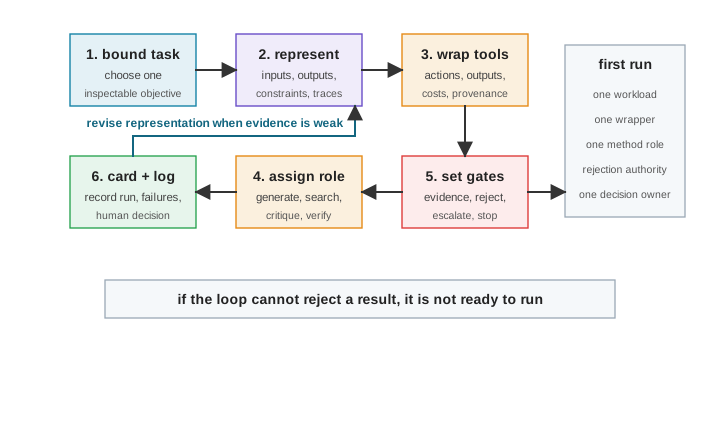
Figure A.1 gives the bootstrap pattern. It is deliberately minimal. Choose one task, one representation, one tool wrapper, one method role, one set of evidence and rejection gates, and one decision owner. If that small loop cannot reject a result, a larger version will only hide the problem.
A.1 The Architecture Loop Playbook
If an engineer is asked how to incorporate AI into an architecture or hardware/software co-design loop, the first answer is not to pick a model. The first answer is to turn one part of the work into a bounded, represented, rejectable loop. AI then has a method role inside that loop. It may generate, predict, search, summarize, critique, verify, or coordinate, but it does not own the architecture commitment.
Architect’s checkpoint
Instead of asking where to add AI, an engineer should ask which architecture decision is bottlenecked by representation, search, prediction, review, or evidence. Table A.1 gives the compact playbook.
| Engineer move | Represent | AI role to allow | Gate before trust |
|---|---|---|---|
| Bound the decision | Workload slice, objective, non-goals, and hard constraints. | Summarizer or planner that exposes missing state. | Reject if the task cannot fail visibly. |
| Expose the candidate space | Knobs, legal actions, invalid states, and prior rejections. | Generator or searcher constrained to legal moves. | Reject outputs that invent actions, interfaces, or assumptions. |
| Wrap the feedback | Tool versions, configs, seeds, cost, latency, and failure logs. | Tool caller or coordinator. | Reject runs without provenance or negative traces. |
| Choose the fidelity ladder | Proxy, replay, simulation, synthesis, emulation, or deployment evidence. | Predictor, surrogate, or active learner. | Escalate when the claim or commitment exceeds proxy authority. |
| Review the result | Alternatives, sensitivity, uncertainty, and rejected regions. | Critic, verifier, or explanation generator. | Reject if the result cannot explain what would change the decision. |
| Commit or revise | Human-owned acceptance, escalation, or rollback decision. | Decision-support only. | The architect signs off; the method never owns the commitment. |
This is deliberately smaller than an enterprise AI strategy. It is an architecture loop playbook because it treats architecture work as coupled to tools, costs, constraints, evidence, and irreversible commitments. A team can repeat it for an accelerator search, a memory-hierarchy study, a compiler/runtime option, a benchmark update, or a verification triage task, but the same rule holds. Make the loop explicit before giving the method more authority.
The rest of this appendix walks the same discipline step by step, following the loop in Figure A.1; the playbook cuts it by decision, the sections below cut it by build step.
A.2 Choose a Bounded Task
Start with a task where success and failure can be inspected. Good first tasks include a small design-space exploration, workload characterization, configuration search, benchmark generation, design review, or report critique. Avoid starting with “design a processor” or “automate the flow.” Those are too large to debug.
A bounded task has three properties. First, the input is known, such as a workload slice, design question, simulator configuration, benchmark version, or review packet. Second, the output is inspectable, whether it is a ranked list, plot, rejected candidate set, evidence ledger, critique, or recommendation. Third, failure is useful. If the loop gives a bad answer, the trace explains whether the problem was the task, representation, tool wrapper, method, evidence, or human instruction.
For the lighthouse prompt, the first task should not be the whole mobile XR compute subsystem. A better first task might be to characterize a slice of XRBench, a benchmark suite for extended reality workloads, and compare three compute-organization candidates–a vector CPU extension, a deliberately loose accelerator stress case, and a shared-memory SoC block–with a latency-energy-power evidence ledger and rejected alternatives. The loose candidate is a way to expose interface costs, not the full tightly coupled accelerator space. That is still hard, but it is a loop rather than a wish, and it is deliberately the same slice Chapter 8 walks. The first loop you build can be one the book has already run.
A.3 Choose a Representation
The representation is what the loop can see and change. A minimal representation may include configuration files, workload traces, simulator outputs, architecture descriptions, scripts, plots, notes, constraints, and prior rejected candidates. It does not have to be perfect. It does have to be explicit.
Write down four boundaries before running anything:
- What the loop may read.
- What the loop may write.
- What the loop must not change.
- What assumptions live outside the representation.
The last item matters. Early loops often fail because important state is outside the loop, such as a simulator default, a benchmark version, an undocumented constraint, a hidden preprocessing step, a fragile script, or a human judgment that never gets recorded. Those gaps are not embarrassing. They are exactly what the bootstrap loop is meant to expose.
A.4 Wrap the Environment
An environment is more than a command that returns a number. It defines the actions the loop can take, the observations it receives, the constraints it must obey, the cost of each evaluation, and the provenance recorded for each run.
For a first wrapper, keep the interface narrow:
- a small action space, such as a few tunable architecture parameters;
- a fixed workload or small workload set;
- explicit invalid-action checks;
- one low-fidelity metric and one higher-fidelity check;
- logged tool versions, seeds, configurations, and errors;
- a run directory that preserves successful and failed attempts.
The wrapper should make failure visible. If a configuration does not compile, times out, violates a constraint, uses a stale benchmark, or produces an incomplete log, that result should be recorded as a negative trace rather than deleted. A first environment that records failures is more valuable than a larger environment that only reports successes.
A.5 Assign the Method Role
Do not begin by asking a model or automated optimizer to do everything. Choose one method role and make it explicit. The role might be generator, searcher, predictor, summarizer, critic, planner, tool caller, verifier, or coordinator.
The role should match the task and feedback budget. If evaluations are cheap, a search or optimization role may be reasonable. If evaluations are expensive, a critic, summarizer, or surrogate predictor may be more useful. If the representation is messy, the first useful role may be extraction and organization, not optimization. If the tool wrapper is fragile, the first role may be a verifier that checks whether runs are valid.
A useful rule is to write the method sentence before implementing the method:
This system will act as a role that takes inputs, is allowed to perform actions, receives feedback, and produces evidence for a human decision.
If that sentence cannot be completed, the loop is not ready for method work.
A.7 Fill in the Minimal Design-Loop Card
Appendix B gives the full design-loop card and review rubric. For a first bootstrap pass, use the compact checklist in Table A.2. Fill it in before running the loop, then revise it after the first run.
| Step | Output to record | Stop or revise if |
|---|---|---|
| Bound task | One inspectable architecture question, output type, and non-goal. | The task cannot fail in an informative way. |
| Representation | Files, traces, constraints, assumptions, and allowed writes. | Important state remains hidden or undocumented. |
| Environment | Actions, observations, invalid states, cost, logs, and tool versions. | The wrapper hides failures, provenance, or action semantics. |
| Method role | One explicit role, such as generator, searcher, critic, verifier, summarizer, or coordinator. | The method is asked to generate, verify, decide, and explain without boundaries. |
| Evidence rules | What counts as sufficient, insufficient, and higher-fidelity evidence. | A cheap proxy is being used as a final architectural claim. |
| Rejection authority | Constraint failures, invalid actions, proxy mismatch, missing logs, and escalation triggers. | Nothing in the loop can say no. |
| Human decision | The named architect-owned decision and commitment level. | The tool appears to own the final commitment. |
Filled in for one decision, the checklist collapses into a single bounded move; the lighthouse instance below shows the shape.
Lighthouse prompt: Bound one XR decision before automating it
In the Lighthouse prompt. Use “XRBench-class real-time mobile XR workload” to fix one workload slice and deadline, “3 W TDP target” as a hard rejection gate, and “vector-capable CPU, accelerator, or SoC block” as the candidate set. Keep “64-bit RISC-V-based” fixed in this first loop. Candidates must preserve the ISA/ABI, compiler/runtime path, and software compatibility rather than inventing a new contract.
Loop role. The AI role is searcher and summarizer. It must sweep tunable parameters, organize latency, energy, power, and data-movement evidence, and preserve rejected alternatives.
Boundary. This is not the whole subsystem; cache policy, voltage assumptions, full memory hierarchy, physical design, and reliability evidence are next-loop questions unless they are needed to reject a candidate now.
Takeaway. A human decides which candidate, if any, has enough evidence to carry to RTL.
The first pilot should fit in a short review cycle. Table A.3 is a practical agenda for a team, research project, or design-review group.
| Pilot step | Output | Timebox |
|---|---|---|
| Pick one decision | A single architecture question with an owner and a non-goal. | 15 minutes. |
| Fill the card | Task, representation, environment, evidence, rejection, and decision fields. | 30 minutes. |
| Run one cheap check | One proxy, replay, compile, simulator, or review result with provenance. | One afternoon or less. |
| Preserve one failure | A rejected candidate, invalid action, missing input, or tool error with reason. | During the first run. |
| Review commitment | A note that says whether the evidence supports exploration, implementation, escalation, or rejection. | 15 minutes. |
After the first run, evaluate the loop’s effectiveness. The loop should produce a trace another architect can read and preserve both successful and failed attempts. The generated evidence must match the commitment level, and a rejection authority must trigger informatively when appropriate. Finally, identify what should be revised first among the task, representation, environment, method, evidence rule, or human decision.
If the loop fails to produce a readable trace, do not add more AI participants. Make the loop visible. If nothing in the loop could reject a result, do not trust the output. Add a rejection gate. The simplest credible Architecture 2.0 loop is not the one with the most automation. It is the one whose evidence and failure modes are visible enough to improve. Appendix B turns that first run into a blank card and review rubric that can be reused for papers, proposals, design projects, and design reviews.